
ChambApp: Job Search in NY
Ollin SystemsBusiness
4.7198.00 Reviews
- Version
- 3.5.1
- Installs
- 50.00K
- Age Rating
- Everyone
Screenshots

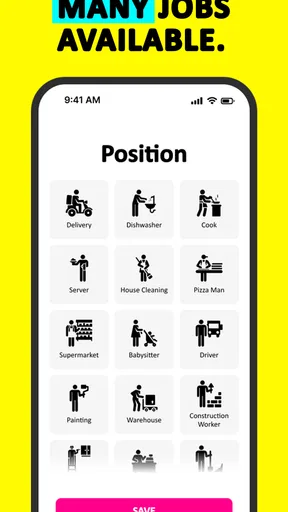
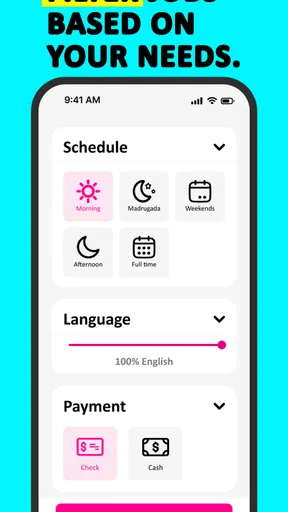
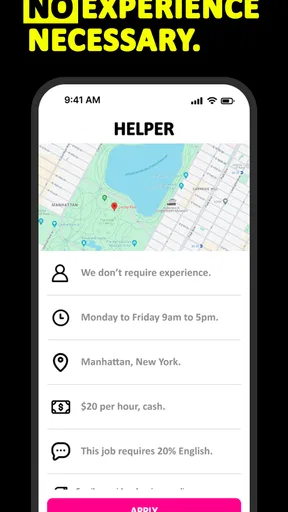
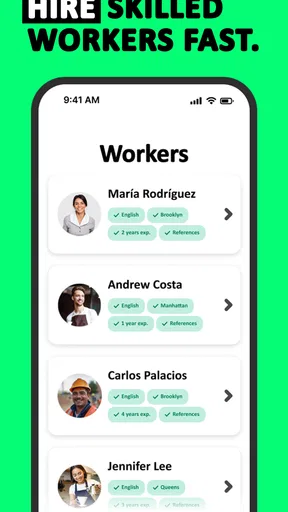
Our Review of ChambApp: Job Search in NY
 Analysis by Appyee
Finding work in New York can feel like a job in itself. Open positions appear in different places, employers ask for different details, and it is easy to lose track of where you applied or which opportunity still needs a reply. I tried ChambApp as a focused job-search tool for working people in New York, and my impression is that its value comes less from flashy extras and more from giving a local search a clearer place to start.
It is a free business app from Ollin Systems, aimed specifically at the New York working class rather than at a broad international audience. That focus matters. Someone looking for nearby employment, changing shifts, or a more practical route into work may find the app more relevant than a huge general-purpose job board. At the same time, I would not treat it as a complete replacement for every other job-search method. It works best as one part of a steady system.
How I would build a job-search routine around ChambApp
I’d build a routine that keeps discovery, applications, and follow-ups distinct, so opening ChambApp leads to a clear next step rather than another long browsing session. I’d also set aside a brief weekly check to see whether the roles I’m finding still fit my location, schedule, and experience; that makes it easier to adjust the search deliberately.
Start with a plan before opening the app
The biggest mistake I see in job searching is opening several apps without deciding what information needs to be captured. I prefer to begin with a short list: the kind of work I can accept, the neighborhoods or travel routes that are realistic, the shifts I can work, and the date by which I need income. That preparation makes a focused local app more useful because I can judge each opportunity against real limits instead of reacting to every listing.
For example, if I were searching after a morning shift, I would separate jobs into three practical groups: positions worth applying for today, positions that need more information, and positions that do not fit. That simple division prevents the common habit of saving everything and applying to almost nothing. ChambApp makes more sense in this workflow as a place to discover and act on relevant opportunities, not as a substitute for deciding what “relevant” means.
I would also keep a basic record outside the app for applications already sent. A note with the employer, role, date, contact details, and next action is enough. This is a useful trade-off: a dedicated job app can help with discovery, while a separate personal record gives me control over follow-ups. I would not assume that one tool should hold the entire process.
Capture opportunities before they disappear from your attention
When I find a promising position, I try to record the useful details immediately rather than trusting my memory. The important points are the role, location, schedule, requirements, and what I need to do next. If I cannot apply at that moment, I mark it as a same-day task in my own notes. This small step is especially valuable for people searching between shifts, on public transportation, or during short breaks.
A local job-search app can reduce browsing time, but it cannot make a vague application process clear by itself. I still want to know whether the position fits my travel time and whether I can explain my experience for that particular role. My advice is to use the app for targeted discovery, then pause long enough to prepare a specific response. Sending many rushed applications is usually less useful than sending fewer applications that match the work I can actually accept.
One practical technique is to use a three-question check before moving forward: Can I get there reliably? Can I work the stated hours? Can I show a relevant skill or experience? If the answer is no to two of these, I would leave the opportunity aside. This keeps the search from becoming an endless scrolling session and helps preserve energy for employers who are a better fit.
Turn the search into a repeatable weekly routine
I found the strongest case for ChambApp when I imagined using it at set times instead of checking it constantly. A short session at the beginning of the week can identify realistic openings. A second session can focus on completing applications. Later, I can review replies and decide which employers deserve a follow-up. The exact schedule should match a person’s availability, but the principle is the same: separate discovery from action.
This routine also makes it easier to notice whether the search is producing useful results. If I keep seeing jobs that fail my location or schedule requirements, I should adjust my search habits or broaden one specific condition. If the opportunities are suitable but I am not applying, the problem is probably workflow rather than discovery. That distinction is one of the more useful insights I take from using a specialized app: it can show where the process is getting stuck, provided I review my behavior honestly.
I would keep application materials ready before a serious search session. A current résumé, a short description of relevant experience, and a few examples of availability can reduce friction. I would still customize the wording for each employer. A prepared base is helpful; sending identical information everywhere is not. The app can be the starting point, but the quality of the application still depends on the person using it.
Where the app fits better than broad alternatives
Large job boards offer breadth, which can be useful for professional roles, remote work, or searches outside one city. Their weakness is that a person looking for practical local employment may have to filter through a lot of material that does not match everyday needs. A general social network can help through personal contacts, but it depends heavily on who is already in your network. ChambApp’s local purpose gives it a different role: it is more focused for someone whose search is tied to New York and to immediate working opportunities.
That focus is also its main limitation. If I were seeking a specialized career, applying across several states, or comparing a large number of remote positions, I would use a broader platform alongside it. I would not expect a local tool to provide the same range as a national marketplace. The better comparison is not “which single app wins?” but “which tool handles this part of my search most efficiently?”
For a person who already receives work through referrals, the app may be less important. A trusted contact can sometimes provide faster context about an employer than any listing. I would still consider checking ChambApp when I need more options, but I would not abandon a reliable network simply because a dedicated app exists. Good job searching often combines local listings, direct conversations, and careful follow-up.
Friction points I would plan for
The first friction point is attention. A job-search app can make browsing feel productive even when no application is completed. I would set a clear limit for browsing and end each session with one concrete action: apply, prepare a question, save a detail in my tracking note, or discard the opportunity. Without that rule, the app risks becoming another place to scroll.
The second is incomplete personal organization. Even if an opportunity is easy to find, I still need a way to remember what happened afterward. I would not rely on opening the app again and hoping I remember the employer. A simple follow-up list is more dependable. This is not a criticism of the local focus; it is a reminder that discovery and application management are separate jobs.
The third is expectation. A strong average rating of 4.7 from around 2.7 thousand ratings suggests that many users find the app useful, and it has passed 50 thousand installs. Those figures give me confidence that it is not an obscure experiment, but they do not guarantee that every search will produce a suitable opening. Employment depends on timing, qualifications, location, and employer response. I would judge the app by whether it improves my process, not by expecting it to guarantee a job.
There is also a financial detail worth noticing. The app is free to install, while optional in-app purchases range from $2.99 to $4.99 per item. I would begin with the free experience and only consider a purchase if I clearly understood what it added to my own workflow. Someone with a tight budget should avoid paying simply because a search feels urgent. A paid option is worthwhile only when it saves meaningful time or solves a specific problem for that user.
Everyday scenario: searching between two shifts
Imagine a worker finishing a morning shift in Queens with a few minutes before heading to another commitment. Instead of browsing randomly, I would open ChambApp with two filters in mind: the neighborhoods I can reach and the hours I can actually work. I would review a small number of plausible opportunities, note the employer and role, and choose one application to complete later when I have a quiet place and the right documents.
That approach is more realistic than trying to finish every step on a phone during a rushed break. The app helps me capture direction; my later work provides accuracy. When I return to the opportunity, I can check my résumé, prepare a short explanation of relevant experience, and write down any question about schedule or location. If the employer responds, my tracking note tells me what I applied for and when. This is where the app becomes part of a sustainable system rather than a one-time download.
Who will get the most from it
I would recommend trying ChambApp to someone living in New York who wants a practical local starting point, especially if broad job boards feel overloaded or disconnected from the work they can realistically reach. It may also suit a person returning to work, changing schedules, or trying to create a more disciplined search routine. The Everyone age rating makes it broadly accessible, although the usefulness still depends on the user’s employment goals and ability to follow through.
I would be more cautious for someone searching outside New York, pursuing a narrow professional specialty, or needing advanced application tracking across many employers. That person may be better served by a larger employment platform, a professional network, or a spreadsheet-based system used alongside a local source. I would also skip making it the only tool if my income depended on reaching employers in several regions.
On the technical side, the app supports devices running Android 7.0 or later, and the current version is 3.5.1. That makes it approachable for people who do not own a recent phone. I still recommend keeping the device updated when possible and maintaining personal application notes separately, because a dependable workflow should not depend on remembering everything inside one app.
My final recommendation
ChambApp is most convincing when I use it with boundaries. I decide what work fits, search locally, capture only realistic opportunities, and reserve time to apply carefully. Its identity as a New York-focused business app gives it a clearer purpose than a generic listing service, and the free entry point makes it easy to test without committing money.
My honest view is that it is not a magic shortcut and should not be treated as one. The app cannot replace a résumé, a follow-up habit, transportation planning, or a direct conversation with an employer. It can, however, make the first stage of a local job search more focused. The best reason to adopt it is not to browse more jobs, but to turn relevant openings into consistent next steps.
After using it, I would keep it in my job-search toolkit if I were looking for work in New York and wanted a local channel that complements referrals and broader platforms. I would start with the free version, build a simple routine, and measure success by completed applications and useful follow-ups rather than screen time. For that audience, Ollin Systems has created a focused option that can be genuinely helpful when paired with personal organization and realistic expectations.
Verdict
Strengths of ChambApp: Job Search in NY
- Focused on finding jobs specifically in New York.
- Useful filters can help narrow searches by role and location.
- Convenient access to local employment opportunities on mobile.
- Job listings may be relevant to New York-based applicants.
- Simple format makes browsing vacancies quick and accessible.
Limitations of ChambApp: Job Search in NY
- Limited usefulness for people searching outside New York.
- Listing quality may vary between employers and job categories.
- Some opportunities may have incomplete salary information.
- Competition can be high for popular local positions.
- You may need to verify listings before sharing personal details.
Similar Picks in This Category
View All
LinkedIn: Community & Network
LinkedIn3.8

Zoom Workplace
zoom.com4.1

Microsoft Teams
Microsoft Corporation4.6

Meta Business Suite
Meta Platforms, Inc.4.6

Webex Meetings
Cisco Systems, Inc.4.5

TeamViewer Remote Control
TeamViewer4.4
Frequently Asked Questions
What is ChambApp: Job Search in NY, and who is it designed for?
ChambApp: Job Search in NY is a mobile platform focused on helping people discover employment opportunities in New York. It is intended for job seekers searching for full-time, part-time, temporary, entry-level, or local positions. The app may be useful for candidates who want to browse openings from a phone, review basic job information, and organize their search without relying exclusively on traditional recruitment websites.
How do I search for jobs using ChambApp?
After opening ChambApp, users can generally explore available vacancies by entering a job title, skill, company, or preferred location. Since the service focuses on New York, search results may be narrowed by borough, neighborhood, distance, or other filters when available. It is worth trying several related keywords because employers may describe similar roles differently, and checking listings regularly can help you find newly posted opportunities.
Does ChambApp guarantee employment or verify every job listing?
No job-search application can guarantee that a user will be hired, and ChambApp should be treated as a tool for discovering opportunities rather than a recruitment promise. Before applying, carefully review the employer, position details, requirements, salary information, and application instructions. Be cautious with listings that request money, sensitive banking information, or unusual personal documents before a legitimate interview or hiring process.
Is ChambApp free to download and use?
The application may be available to download without an upfront charge, but the exact pricing model can depend on the current version, platform, region, or optional features. Before installing, review the Google Play Store or Apple App Store listing for information about advertisements, subscriptions, in-app purchases, and permissions. Also check the developer’s terms so you understand whether any advanced job-search or contact features have additional costs.
What should I prepare before applying for a job through ChambApp?
Before using ChambApp to apply, prepare an updated résumé, a professional email address, and a short description of your experience and availability. Some employers may also request references, certifications, work authorization details, or a cover letter. Make sure your application matches the listing and avoid copying the same résumé for every role. If an application redirects you to another website, confirm that the destination appears legitimate before submitting personal information.
